
Browser demo · Keyboard and mouse
First shovel playtest in Dig Out the Village
We walked toward Valcandil’s fountain, tried the starting shovel, then opened Grandpa’s workshop. The blade was on screen the whole time. The counters told us whether the opening pass had worked.
Try it in the browser demo
What happened on the first pass
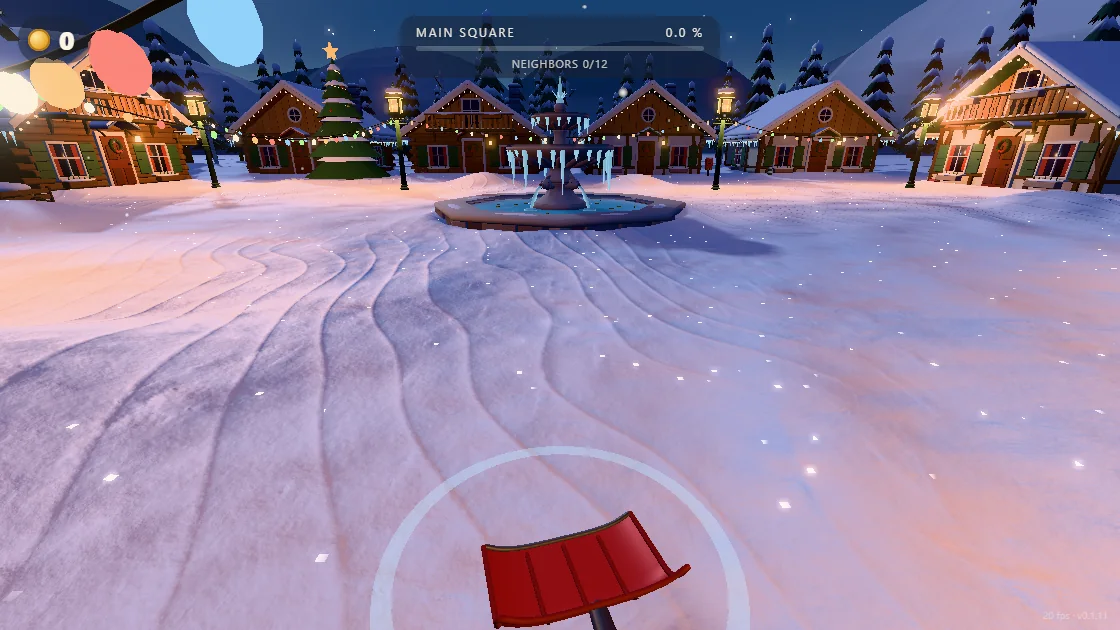
After entering the square, we moved toward the fountain, lowered the view and tried nine clicks in front of us. The coin count stayed at 0 and the Main Square reading stayed at 0.0%. The neighbor counter also stayed at 0/12. We left that patch without a visible result we could use.
Use the picture as a reference for a first check. The shovel is visible and the ring is on the ground, so the scene has loaded. If you can look around but repeated swings leave the same view, test the edge of a drift close enough to compare after one click.
Read the tool before spending coins
With the game focused, Tab opened Grandpa’s workshop even at a balance of zero. In our run the starting blade read 0.65 m wide, the Strength stat read 3.8 m/s, and the Ice stat showed no. Those readings describe the shovel in the screenshot.
Close the workshop with Tab or Esc. Use the fountain to find your way back, then try a fresh edge of snow before judging the tool. If your target is ice, check the Ice entry and see the shovel upgrade guide for how to compare the next reachable stars.

One quick check to try in your run
- Pick a reference point. Put the ring on the edge of a drift beside a recognizable feature. Keep the feature in view after you swing.
- Compare the edge and the counters. Look for a cut next to that feature. Check coins and clearing progress again after several fresh cuts.
- Change one thing at a time. If you still see no change, step closer and try once. Then move to softer snow. Use a new visible edge for each comparison.